
Baby With Mustache: Trend, AI Tutorial and FAQ
Explore the mustache baby trend, choose a photo, try an original prompt and understand credits, privacy and generation limits.
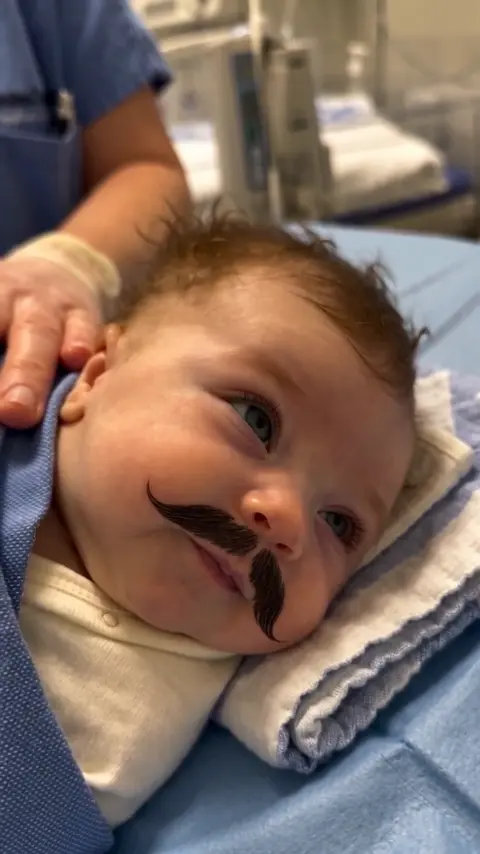
What is the baby with mustache trend?
The joke pairs a baby's small face with an unexpectedly grown-up mustache. Hospital-style blankets, a serious expression and tiny head movements make the contrast easy to recognize. “Baby With Mustache,” “Mustache Baby” and “Baby With Moustache” are ways people describe the theme. “Born retired” is the joke, not a description of a medical event.
The hospital-style clip was circulating on social platforms in late October 2026. Metro Ecuador reported on it on October 23. Later coverage discussed the “Don Julio” reactions and reports of digital alteration. Some posts described an Ecuador baby; that wording belongs to the circulating story. Your own recreation should be clearly labeled as AI entertainment rather than presented as birth footage.
For contemporary coverage, see Metro Ecuador's October 23 report and IBTimes UK's October 26 report.
How to make your own video
- Open the Baby Born With Mustache generator.
- Upload one clear photo of a baby, with permission from the parent or guardian. Use JPG, PNG or WebP, up to 10 MB.
- Choose 480p or 720p and check the displayed credit requirement. Sign in and ensure you have enough credits before generating.
- Follow progress in your creations. When the task finishes, watch the full clip before downloading the vertical MP4.
The site supplies the creative instructions automatically. You do not need to upload a separate video or paste the example prompt below. The hospital result is approximately ten seconds long, with sound and a 9:16 frame.
Choose a photo that gives the AI useful detail
Use even lighting and a view close to straight-on. Keep the forehead, eyes, nose, mouth and chin visible. Avoid pacifiers, hands across the face, strong beauty filters and a second face in the frame. A clear photo gives the system more information; it does not guarantee an exact likeness.
The homepage examples show images alongside videos for comparison. Look at eye shape, cheek width and hairline, not just hair color or the presence of a mustache. During playback, check whether these details change when the head turns.
An original prompt for a custom-prompt tool
This educational example is for a separate image-to-video tool that accepts custom instructions. It is not an extra control on this site's upload form.
Make a gentle vertical video inspired by this baby portrait. Use the photo for the facial outline, eyes, nose, lips and hair. Show the baby comfortably wrapped in a soft blanket, with a steady close-up and even light. Add a dark, textured mustache just above the upper lip. Let the baby blink and turn slightly while keeping the facial details consistent and the lips visible. Keep the movement small and the background calm. Avoid extra faces, captions and logos. Present the result as fictional AI entertainment.
A useful prompt separates appearance, action and visual style. Adding more adjectives is not a substitute for checking the result. Keep the first attempt simple enough that you can tell whether the face and mustache remain stable.
Is generation free?
No. Generating a video requires sign-in and sufficient credits. Reading this guide and watching public examples does not generate a new video. Check the pricing page and the cost shown on the form before submitting. This is a credit-based generator, not an unlimited free video maker.
What if the face looks different or the task fails?
AI may change facial proportions, age cues, hair or expressions. A completed task does not guarantee an exact match, and a new generation may still differ. Each new generation uses credits. If you suspect a technical fault, contact support with the task reference before paying to retry.
Failed tasks are handled under the refund and credit-return policy. Returned credits are different from a cash refund; dissatisfaction with a completed video's appearance does not automatically qualify for either.
What happens to the uploaded photo?
The service and its AI providers process the upload; processing is not confined to your device. Read the privacy policy before submitting a child's photo. Do not assume deleting a history item immediately removes all stored copies or overrides a provider's retention practices.
Ready to try it? Upload a photo and check the generation cost.